
1 Introduction
The Joyonway PB553 control panel is an advanced system with a color graphic display designed for hot tubs. The panel is compatible with P20B29, P23B32, and P25B37 control boxes and offers an intuitive interface with real-time visualization of all function statuses.
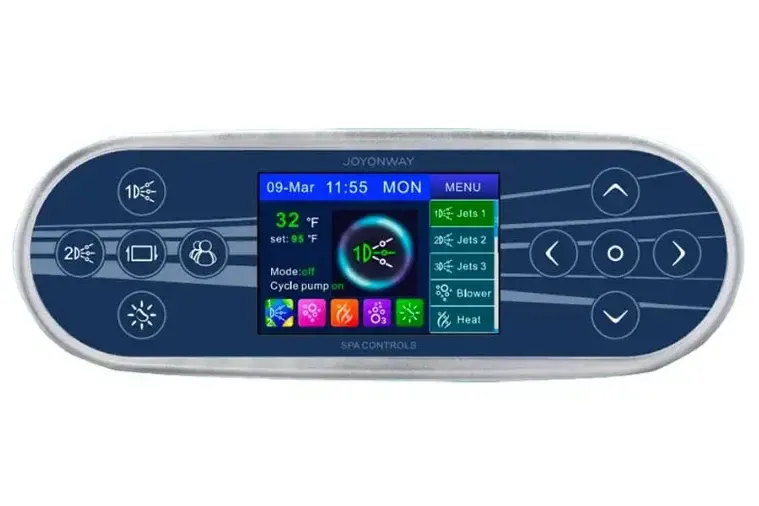
The PB553 panel has 10 buttons divided into three areas:
- Function buttons (left side): direct control of main functions
- Central display: status visualization and menu
- Navigation buttons (right side): menu navigation and confirmation
1.1 Function Buttons
| Button | Function |
|---|---|
| 1D (Pump 1) | Activates/deactivates pump 1 - Cycles between: low speed, high speed, off |
| 2D (Pump 2) | Activates/deactivates pump 2 - Same sequence as pump 1 |
| Screen Invert | Rotates the display 180 degrees |
| Light | Chromotherapy - Cycles: auto, red, green, yellow, blue, purple, cyan, white, off |
| Mode | Quick selection between 4 stored user profiles (PB553 only) |
1.2 Navigation Buttons
| Button | Function |
|---|---|
| Up | Moves cursor up in menu |
| Down | Moves cursor down in menu |
| Left | Moves cursor left / Decreases values |
| Right | Moves cursor right / Increases values |
| OK (center) | Confirms selection / Activates-deactivates function |
1.3 Display Areas
The display is divided into two main areas:
Status area (left):
- Current water temperature
- Set temperature
- Operating mode (Mode: off/1/2/3/4)
- Circulation pump status (Cycle pump on/off)
- Status icons: pumps, blower, heating, ozone, light
Menu area (right):
- List of controllable functions (Jets 1, Jets 2, Jets 3, Blower, Heat)
- Access to settings (Set)
- Scroll bar to indicate position in menu
1.4 Status Icons
| Icon | Meaning |
|---|---|
| Pump (1-4) | Number on green background=low speed, orange background=high speed |
| Blower | Illuminated icon=active, semi-transparent=off |
| Heat | Flashing icon=waiting, steady=heating active |
| Ozone | Illuminated icon=active, semi-transparent=off |
| Light | Illuminated icon=light on, semi-transparent=off |
2 Manual Heating Setting
Manual heating allows you to activate the heater directly from the main interface, regardless of automatic cycles.
2.1 Activating Manual Heating
- Navigate in the menu to "Set" and press OK
- Select "Manual Heating" with the Up/Down cursors
- Press OK to set to "On"
- Return to the main interface with "Back"
When manual heating is active, the "Heat" icon is added to the main menu. To start heating, select the Heat icon and press OK.
NOTE: When the Manual Heating function is disabled (Off), the Heat option disappears from the main menu.
3 Heating Times (Heating Time)
The system allows programming automatic heating on two independent time slots.
3.1 Time Slot Configuration
- Access Set, then Heating Time
- Select slot 1 or 2 with the cursors
- Press OK to activate (ON) or deactivate (OFF) the slot
- Press Right to enter the time setting
- Use Up/Down to modify values
- Use Left/Right to move between start time and end time
- Press Left/Right together to exit editing
- Select "Back" to save and return
3.2 Programming Examples
| Slot | Start | End | Result |
|---|---|---|---|
| 1 ON | 06:15 | 13:15 | Heating from 06:15 to 13:15 |
| 2 ON | 10:15 | 16:15 | Overlap: heating 06:15-16:15 |
| 1 ON | 20:00 | 10:00 | Night heating until the next day |
WARNING: Programmed times are based on the system clock. Make sure date and time are set correctly.
4 Manual Circulation Setting (Manual C.Pump)
This function allows manual control of the circulation pump, when the system has a dedicated pump separate from pump 1.
4.1 Activating Manual Circulation
- Access Set
- Select "Manual C.Pump"
- Press OK to set to "On"
When active, the "CPump" icon is added to the main menu for direct control.
NOTE: If the system does not have a dedicated circulation pump, pump 1 at low speed is used for the circulation function.
5 Filtration Settings (Filter Time - FLTR1 and 2)
Regular filtration is essential to keep the water clean and the tub in good condition. The system allows programming two automatic filtration cycles.
5.1 Programming Filtration Cycles
- Access Set, then Filter Time
- Select slot 1 or 2
- Set ON or OFF with the OK button
- Configure start and end times as for heating times
- Select "Back" to save
Programming follows the same rules as heating times: slots can overlap and can cross midnight.
WARNING: Regularly replace or clean the paper filter based on water quality and frequency of use.
6 Modes (Mode - 5 Storable Profiles)
The PB553 panel offers 4 customizable user profiles (Mode 1-4) plus Off mode. Each profile can store preferred settings for quick access.
6.1 Functions Storable in Profiles
- Pump status (Jets)
- Blower status
- Ozone status
- Heating status
- Display brightness
6.2 Saving a Profile
- Configure all desired functions
- Access Set, then Mode
- Select the profile to save (Mode 1, 2, 3, or 4)
- Press OK - a filled square indicates the profile has been saved
- Select "Back" to exit
6.3 Recalling a Profile
From the main interface:
- Navigate to "Mode" in the menu
- Press OK
- Select the desired profile
- Confirm with OK
Alternatively, use the quick Mode button (PB553 only) to cycle through profiles: Mode 1, Mode 2, Mode 3, Mode 4, Mode 1...
NOTE: Before using profiles, you need to configure and save them.
7 Temperature Unit (Temp Unit)
The system allows displaying temperature in Celsius (C) or Fahrenheit (F).
7.1 Changing the Unit of Measurement
- Access Set
- Select "Temp Unit" with the cursors
- Press OK to toggle between C and F
8 Temperature Setting (Temperature)
The settable temperature range is from 10°C to 40°C (50°F - 104°F).
8.1 Changing the Target Temperature
- Access Set, then Temperature
- Use the Left/Right cursors to decrease/increase the value
- The new temperature is automatically saved when exiting the menu
When the set temperature is higher than the current temperature and the heating function is active, the heater will activate automatically.
NOTE: For accurate temperature reading, at least one pump must be running for at least 2 minutes.
9 Ozonizer (Ozone Mode)
The ozonizer disinfects the water using ozone. It can operate in automatic or manual mode.
9.1 Configuring Ozone Mode
- Access Set
- Select "Ozone" (if present in the system)
- Press OK to toggle between Auto and Manual
In Auto mode: the ozonizer activates automatically according to cycles programmed by the control system.
In Manual mode: the "Ozone" icon is added to the main menu for direct control.
NOTE: Ozone contributes to water disinfection. For reuse beyond 72-96 hours, it is recommended to supplement with specific products such as Bromine or Active Oxygen.
10 Lock (Autolock)
The automatic lock function prevents accidental activation of controls.
10.1 Configuring Automatic Lock
- Access Set
- Select "Auto Lock"
- Press OK to cycle through options: Off, 30S, 1 min, 3 min
| Setting | Behavior |
|---|---|
| Off | Lock disabled |
| 30S | Lock after 30 seconds of inactivity |
| 1 min | Lock after 1 minute of inactivity |
| 3 min | Lock after 3 minutes of inactivity |
10.2 Unlocking the Panel
When the panel is locked, the indication "Child_lock" or "Press OK for 3 seconds to unlock" appears.
- Press and hold the OK button for 3 seconds
- When "Auto Lock" disappears from the screen, the panel is unlocked
11 Brightness
Display brightness is adjustable to adapt to different ambient lighting conditions.
11.1 Adjusting Brightness
- Access Set, then Brightness
- Use the Left/Right cursors to adjust the value (range 1-30)
- The setting is automatically saved on exit
NOTE: Brightness can be included in Mode profiles for quick recall.
12 Time and Date Setting
Correct date and time setting is essential for automatic heating and filtration cycles to work properly.
12.1 Configuring Date and Time
- Access Set, then Date and Time
- Press OK to enter editing
- Use the Up/Down cursors to modify the selected value
- Use Left/Right to move between fields (hour, minutes, year, month, day)
- Press OK or select Back to save
NOTE: In case of brief power interruptions, the clock maintains settings for a few days. After long periods without power, check and reset date and time.
13 Wi-Fi (Optional Module)
With the optional Wi-Fi module, the hot tub can be controlled via smartphone or tablet through a dedicated app.
13.1 Wi-Fi Module Technical Specifications
| Parameter | Value |
|---|---|
| Power Supply | 12 VDC - 200 mA |
| Frequency | 2.4 GHz |
| Standard | IEEE 802.11 b/g/n |
13.2 Wi-Fi Modes
- Access Set, then Wifi
- Press OK to select the mode:
| Mode | Description |
|---|---|
| Off | Wi-Fi disabled |
| STA (Standard) | Connects to an existing Wi-Fi network (home router) |
| AP (Access Point) | Creates its own Wi-Fi network (SSID: Joyonway-xxxx) |
13.3 Connection in AP Mode
- Set the module to AP
- On the mobile device, search for the "Joyonway-xxxx" network
- Connect using the default password: "Joyonway"
- Open the dedicated app for control
13.4 Connection in STA Mode
- Set the module to STA
- Configure via app the network name (SSID) and router password
- The module will connect to the home network
- Control the hot tub from the local network or from the internet
NOTE: From the Wi-Fi menu, you can reset the password to factory settings.
14 Error Messages
When alarm conditions or issues requiring attention occur, the display shows a box with an error code and a brief description. Below is the complete list of diagnostic codes with detailed explanations for troubleshooting.
WARNING: If a malfunction cannot be resolved by following the instructions provided, immediately stop using the hot tub and contact technical support. Qualified technicians can identify the cause of the problem with all available information.
14.1 Temperature Sensor Errors
14.1.1 F1 - Temperature Sensor Disconnected
This error indicates that the system has detected that the temperature sensor is not properly connected to the control board. The temperature sensor is an essential component for safe hot tub operation, as it constantly monitors water temperature and protects the system from overheating.
Possible causes:
- Sensor connector disconnected from the main board
- Damaged or broken sensor cable
- Defective temperature sensor
- Oxidation or corrosion on connector contacts
- Control board problems (rare)
What to do:
- Turn off the hot tub from the main switch
- Access the technical compartment by removing the skirt panel
- Locate the Joyonway control box and verify that the temperature sensor connector is properly inserted
- Visually check the sensor cable for any damage
- Reconnect power and check if the error persists
- If the error remains, contact Customer Service for sensor replacement
WARNING: Do not use the hot tub with this error active. Without a functioning temperature sensor, the system cannot monitor water heating, with potential overheating risks.
14.1.2 F2 - Temperature Sensor Shortcircuit
This error indicates that the system has detected a short circuit in the temperature sensor. The short circuit can be caused by an internal sensor failure or a wiring problem.
Possible causes:
- Internally failed temperature sensor
- Water infiltration in the sensor connector
- Damaged sensor cables touching each other
- Compromised cable insulation
- Oxidized or corroded connector
What to do:
- Immediately turn off the hot tub from the main switch
- Access the technical compartment
- Visually check the sensor and its cables
- Check that there is no water infiltration in the technical compartment
- Disconnect and reconnect the sensor connector, verifying that contacts are clean and dry
- If the error persists, contact Customer Service for sensor replacement
WARNING: Do not attempt to repair the sensor yourself. Replacement must be performed by qualified technical personnel.
14.2 Water Temperature Errors
14.2.1 F3 - Temperature is Too High
This error indicates that the system has detected a dangerously high water temperature. This typically happens when the heater is running but there is not enough water in the tub or water flow through the heater is inadequate.
DANGER: DO NOT ENTER THE WATER when this message appears. The water could be dangerously hot and cause burns.
Possible causes:
- Water level too low in the hot tub
- Complete lack of water in the tub
- Completely clogged filters preventing water flow
- Circulation pump not working
- Obstruction in hydraulic pipes
- Closed valves in the hydraulic circuit
- Skimmer grate obstructed
What to do:
- Do not enter the water under any circumstances
- Turn off the hot tub from the main switch
- Immediately check the water level: it must reach at least the skimmer grate
- If the level is low, top up with fresh water
- Check that the skimmer grate is not obstructed by debris
- Check the paper filters and clean them if necessary
- Verify that all valves in the hydraulic circuit are fully open
- Wait for the water to cool naturally before restarting the system
- If the problem persists after checking all points, contact Customer Service
14.2.2 F4 - Temperature is Too Low
This error indicates that the system has detected very low water temperature, potentially close to freezing point. This is an important warning to prevent frost damage to the hydraulic system.
WARNING: Water freezing in the pipes can cause irreparable damage to the hydraulic system, pumps, and heater.
Possible causes:
- Very low ambient temperatures (winter)
- Hot tub left without electrical power during cold period
- Heater not working
- Thermal cover missing or not properly positioned
- Hot tub thermal insulation compromised
What to do:
- Verify that the thermal cover is properly positioned and secured
- Check that the heater is working and set to an adequate temperature (minimum 15°C in winter)
- If the hot tub is outdoors during winter, ensure it always remains electrically powered
- Start a pump to circulate water and verify there are no frozen sections in the pipes
- If you suspect freezing has started, DO NOT force pump startup: contact support immediately
- For long periods of winter non-use, perform complete tub drainage
14.3 Safety Thermostat Errors
14.3.1 F5 - Auto-Reset Thermoswitch Open
This error indicates that the auto-reset safety thermal switch has tripped. This protection device activates when the heating tube temperature exceeds safety limits. The switch resets automatically when the temperature drops to normal levels.
Possible causes:
- Heater started without water in the heating tube
- Water flow through the heater too reduced
- Circulation pump not working properly
- Very dirty filters limiting flow
- Air bubbles trapped in the heater circuit
- Insufficient water level
What to do:
- Turn off the hot tub and wait 5-10 minutes to allow the system to cool
- Verify there is enough water in the hot tub (level at skimmer grate)
- Check and clean the paper filters
- Verify that all valves are fully open
- Restart the system: the switch resets automatically once temperature has cooled
- If the error recurs frequently, contact Customer Service for system verification
NOTE: This type of switch is automatic protection that resets itself. If it keeps tripping, it indicates an underlying problem that must be resolved.
14.3.2 F6 - Manual-Reset Thermoswitch Open
This error indicates that the manual-reset safety thermal switch has tripped. This is an emergency protection device that activates when the heating tube temperature reaches critical levels. Unlike F5, this switch does NOT reset automatically and requires manual intervention.
DANGER: This error indicates a serious safety condition. Do not attempt to use the hot tub.
Possible causes:
- Severe heater overheating
- Temperature control system malfunction
- Circulation pump failure
- Temperature sensor problem that caused excessive heating
What to do:
- Immediately turn off the hot tub from the main switch
- DO NOT attempt to reset the switch yourself
- Contact Customer Service immediately
- A qualified technician must verify the system, identify the cause of overheating, and manually reset the safety switch
WARNING: Manual thermal switch reset must be performed ONLY by qualified technical personnel after identifying and resolving the cause of overheating.
14.4 System Errors
14.4.1 F8 - EEPROM (Memory) Error
This error indicates a problem with the main control board EEPROM memory. EEPROM memory stores all system settings and configuration parameters.
Possible causes:
- Electrical disturbances or voltage spikes
- Memory data corruption
- Memory hardware failure
- Electromagnetic interference
What to do:
- Completely disconnect the hot tub electrical power
- Wait at least 10 seconds
- Reconnect power
- Wait for the system to complete the startup procedure (about 5 minutes)
- If the error disappears, verify that all settings are correct (temperature, times, etc.)
- If the error persists after restart, contact Customer Service
NOTE: After a resolved F8 error, you may need to reset date, time, and personal preferences.
14.4.2 F9 - System Settings Error
This error indicates that after power connection, the system detected a problem during configuration verification. Stored configuration parameters may be corrupted or invalid.
Possible causes:
- Configuration data corruption
- Power interruption during a save procedure
- Software update not completed correctly
- Unauthorized modification of system parameters
What to do:
- Completely disconnect the hot tub electrical power
- Wait at least 10 seconds
- Reconnect power
- Wait for the system to complete the startup procedure
- If the error disappears, access the Set and About menu to verify system configuration
- If the error persists, contact Customer Service: system reconfiguration may be necessary
WARNING: Do not modify parameters in the "Function" section of the Set menu without assistance from qualified personnel. Incorrect settings can cause system malfunctions.
14.5 Error Code Summary
| Code | Message | Severity | Immediate Action |
|---|---|---|---|
| F1 | Temperature sensor disconnected | High | Check sensor connections |
| F2 | Temperature sensor shortcircuit | High | Turn off and contact support |
| F3 | Temperature is too high | Critical | DO NOT enter water, check level |
| F4 | Temperature is too low | High | Check heating and cover |
| F5 | Auto-reset thermoswitch open | High | Wait for cooling, check water |
| F6 | Manual-reset thermoswitch open | Critical | Turn off and contact support |
| F8 | EEPROM (memory) error | Medium | Restart the system |
| F9 | System settings error | Medium | Restart the system |
DANGER: In case of F3, F5, or F6 errors, do not use the hot tub until the problem is completely resolved. Overheating can cause serious damage to the system and represents a safety risk for people.
14.6 System Information (About)
To view system configuration and software version:
- Access Set, then About
- Information is displayed about:
- Pump configuration (Jets 1-4): Two speed / One speed / No
- Light: RGB / Yes (on/off) / No
- Blower: Yes / No
- Ozone: Yes / No
- Circulation pump: Yes / No
- Panel ID: 1-4
- Panel version
- Board version
WARNING: The "Function" section in the Set menu allows configuring system loads. This operation should only be performed by qualified technical personnel. Do not modify these settings without contacting Customer Service.