
1 Introduction
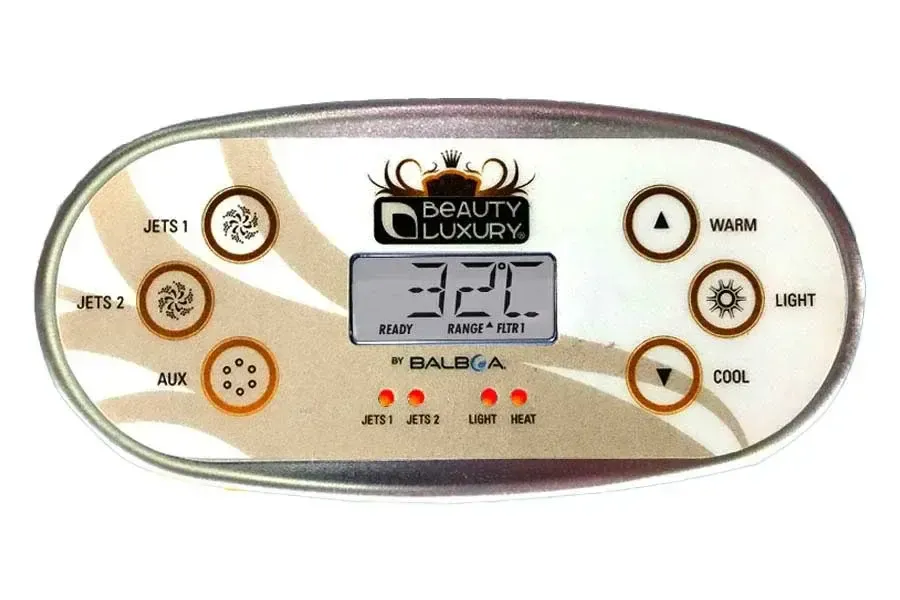
The TP600 Series panel is a touchpad control system compatible with all Balboa Water Group BP Series systems (BP5XX, BP6XX, BP1XXX, BP2XXX). It offers various layout configurations with buttons arranged in different positions around the LCD display.
1.1 System Specifications
| Specification | TP600 Series | TP400 Series |
|---|---|---|
| Compatibility | BP Series Systems | BP Series Systems |
| Software Version | 2.3 or later | 2.4 or later |
| Display | LCD with indicators | LCD with indicators |
1.2 Buttons
The TP600 panel features function buttons arranged around the LCD display. The layout varies depending on the specific model.
| Button | Main Function | Secondary Function |
|---|---|---|
| WARM | Increases temperature | Menu navigation (up) |
| COOL | Decreases temperature | Menu navigation (down) |
| JETS | Activates/deactivates pumps | Changes pump speed |
| LIGHT | Turns light on/off | Confirms menu selections |
| AUX | Auxiliary devices | Secondary pump (if present) |
| FLIP | 180° display rotation | Only on some models |
1.3 Display Indicators
The LCD display shows various information through dedicated indicators.
| Indicator | Meaning |
|---|---|
| READY | Ready mode active - constant temperature maintained |
| REST | Rest mode active - heating only during filtration |
| RANGE (up arrow) | High Range selected |
| RANGE (down arrow) | Low Range selected |
| FLTR1 | Filtration cycle 1 active |
| FLTR2 | Filtration cycle 2 active |
| SET | Set temperature display |
| HEAT | Heating in progress |
2 Initialization Message (Priming Mode)
When the system is powered on, the panel automatically enters Priming mode to allow pump priming. The display shows in sequence: RUN PMPS PURG AIR followed by dashes.
WARNING: Do not use the hot tub during the priming phase. The heater is disabled during this phase.
2.1 Duration and Operation
Priming mode lasts 4-5 minutes. During this phase, no component activates automatically.
- Fill the hot tub to the correct operating level
- Open all valves and jets to release air
- Turn on the main power
- The display will show the startup sequence
- Press JETS to start Pump 1 at low speed
- Press JETS again to switch to high speed
- If present, press AUX to activate Pump 2
- Visually verify that water flows from the jets
DANGER: Do not let an unprimed pump run for more than 2 minutes. This could cause pump damage and system overheating.
2.2 Exiting Priming Mode
Press a temperature button (WARM or COOL) to manually exit Priming mode. If not exited manually, the system will automatically exit after 4-5 minutes.
NOTE: After exiting Priming, the display will show dashes for about 1 minute while the system detects the water temperature.
3 Time Setting
Setting the correct time is important for proper operation of scheduled filtration cycles.
3.1 Procedure
- Press a temperature button to display the flashing temperature
- Press LIGHT repeatedly until TIME is displayed
- If time is not set, SET TIME will appear
- Press a temperature button to enter setting
- Use WARM/COOL to set hours
- Press LIGHT to move to minutes
- Use WARM/COOL to set minutes
- Press LIGHT to confirm
NOTE: Time is not retained during power outages. The system always starts at 12:00. To ensure filtration cycles work correctly, reset the time after each power outage.
4 Temperature Range Setting
The system offers two independent temperature ranges, each with its own set temperature.
| Range | Minimum | Maximum | Indicator |
|---|---|---|---|
| High Range | 26.7°C (80°F) | 40°C (104°F) | Up arrow |
| Low Range | 10°C (50°F) | 37.2°C (99°F) | Down arrow |
4.1 Temperature Adjustment
- Press WARM or COOL to display the set temperature
- Temperature will flash on display with SET indication
- Press WARM to increase or COOL to decrease
- Hold for rapid change
- Wait a few seconds to confirm
4.2 Range Change
- Press a temperature button to flash the display
- Press LIGHT repeatedly until TEMP is displayed
- Press a temperature button to toggle between Range arrows
- Press LIGHT to confirm
NOTE: Freeze protection is active in both ranges.
5 Modes (Ready/Rest)
The system offers two operating modes that determine heating management.
5.1 Ready Mode
In Ready mode, the system constantly maintains water temperature at the set value through polling (check every 30 minutes).
- READY indicator visible on display
- Pump 1 low speed or circulation activates every 30 minutes to detect temperature
- Automatic heating when needed
- Display always shows current temperature
5.2 Rest Mode
In Rest mode, heating occurs only during scheduled filtration cycles.
- REST indicator visible on display
- No automatic polling
- Lower energy consumption
- Display may show RUN PUMP FOR TEMP if pump has not run for over 1 hour
5.3 Ready-in-Rest
If JETS is pressed while in Rest mode, the system temporarily enters READY/REST mode and heats to the set temperature. After 1 hour, it automatically returns to Rest.
5.4 Mode Change
- Press a temperature button to flash the display
- Press LIGHT repeatedly until MODE is displayed
- Press a temperature button to toggle READY and REST
- Press LIGHT to confirm
6 Filtration Settings (FLTR1 and FLTR2)
The system allows programming two independent daily filtration cycles.
6.1 Cycle 1 Programming (FLTR1)
- Press a temperature button to flash the display
- Press LIGHT repeatedly until FLTR 1 is displayed
- Press temperature to display start time (with A or P for AM/PM)
- Press LIGHT, then use temperature to modify hours
- Press LIGHT to move to minutes (15-minute increments)
- Press LIGHT to move to RUN HRS (duration)
- Use temperature to set duration in hours
- Press LIGHT to move to duration minutes
- The system will calculate and show F1 ENDS with end time
- Press LIGHT to save
6.2 Cycle 2 Programming (FLTR2)
Cycle 2 is disabled by default. The procedure is identical to Cycle 1.
- After FLTR 1, continue pressing LIGHT until FLTR 2
- Press temperature to enable (ON) or disable (OFF)
- If enabled, set start time and duration as for FLTR 1
NOTE: Cycles can overlap. Overlap will reduce total filtration time.
6.3 Purge Cycles
At the beginning of each filtration cycle, secondary pumps and/or blower will run briefly to purge stagnant water from pipes.
7 Panel Lock and Unlock
The system offers two lock levels to prevent accidental changes.
7.1 Lock Types
| Type | What It Locks | What It Allows |
|---|---|---|
| TEMP (Temperature) | Temperature and menu settings | Jets, lights, basic functions |
| PANL (Panel) | All function buttons | Only automatic functions |
7.2 Activating Lock
- Press a temperature button to flash the display
- Press LIGHT repeatedly until LOCK is displayed
- Press temperature to choose TEMP or PANL
- Press LIGHT to activate
- Display will show LOCK for 3 seconds then return to normal
7.3 Unlocking
- Press and hold the temperature button (or UP/WARM if available)
- While holding, slowly press LIGHT twice
- Display will show UNLCK
- Release buttons
NOTE: With TEMP lock active, pressing temperature shows the set temperature, but pressing again will display LOCK.
8 Flip Display
The FLIP function allows rotating the display 180° for installations where the panel is mounted upside down.
8.1 Procedure
- Press a temperature button to flash the display
- Press LIGHT repeatedly until FLIP is displayed
- Press temperature to toggle orientation
- Press LIGHT to confirm
NOTE: Some panels have a dedicated FLIP button for quick rotation.
9 Preferences
The preferences menu allows customizing various system settings.
9.1 Accessing Preferences
- Press a temperature button to flash the display
- Press LIGHT repeatedly until PREF is displayed
- Press temperature to access the first item (F/C)
9.2 Temperature Unit (F/C)
- From PREF, press temperature to display F or C
- Press temperature to toggle between °F and °C
- Press LIGHT to confirm and move to next item
9.3 Time Format (12/24)
- From F/C, press LIGHT to access 24HR
- Press temperature to toggle between 12-hour and 24-hour
- Press LIGHT to confirm
9.4 Reminders (REMINDERS)
- From 24HR, press LIGHT to access RE-MIN-DERS
- Press temperature to toggle YES and NO
- Press LIGHT to confirm
9.5 Cleanup
If enabled by manufacturer, allows setting automatic cleanup cycle duration (0-4 hours).
- From REMINDERS, press LIGHT to access CLN-UP
- Press temperature to select hours (0-4)
- Press LIGHT to confirm
10 Error Messages and Diagnostics
This section describes all messages that may appear on the TP600 panel display. Understanding these messages allows for quick problem identification and appropriate action.
WARNING: For persistent error messages or if unsure about the action to take, contact a qualified technician. Do not attempt electrical or plumbing repairs without proper expertise.
10.1 General Status Messages
10.1.1 RUN PMPS PURG AIR - Priming Mode (M019)
This message appears every time the system is powered. It indicates the hot tub has entered Priming mode, a startup phase that allows priming the pumps before normal operation.
Priming mode characteristics:
- Duration: 4-5 minutes
- Heater is disabled during this phase for safety
- No component activates automatically
- Pumps can be manually activated to verify operation
What to do:
- When the message appears, press JETS once to start Pump 1 at low speed
- Press JETS again to switch to high speed
- If a second pump is present, press AUX to activate it
- Visually verify water flows correctly from all jets
- To manually exit Priming, press a temperature button (WARM or COOL)
DANGER: Never let an unprimed pump run for more than 2 minutes. Dry running can cause severe pump damage and system overheating.
10.1.2 42°F TOO COLD - Freeze Protection
This message indicates water temperature has dropped to about 6°C (42°F) and the system has automatically activated freeze protection.
Protection operation:
- Pumps activate automatically to circulate water
- Heater activates to raise temperature
- Protection remains active until temperature rises to safe levels
NOTE: This is an automatic safety system. No manual intervention required, but indicates the hot tub is exposed to very low temperatures. Verify cover is properly positioned.
10.1.3 SFTY TRIP - Suction Safety System (M033)
This message indicates the system has detected a potential suction blockage condition (SVRS - Suction Vacuum Release System). This is an important safety system designed to prevent accidents.
DANGER: Suction blockage can pose a serious safety risk. If a person or object blocks the suction intake, dangerous strong suction can be created.
What to do:
- Do not enter water while message is displayed
- Verify all suction intakes are free from obstructions
- Check that intake grates are intact and properly installed
- Verify water level is adequate
- Check that filter cartridge is not clogged
- System may require power reset to restore
10.2 Heater-Related Messages
10.2.1 WATR TOO HOT - Water Overheating (M029)
This message appears when water temperature exceeds 43.3°C (110°F). This is an important safety warning indicating potentially dangerous temperature.
DANGER: Do not enter water when this message appears. Temperatures above 40°C can cause hyperthermia, heat stroke and other serious health problems.
What to do:
- Do not use the hot tub
- Remove cover to accelerate cooling
- Wait for temperature to drop below 40°C
- If problem recurs frequently, check temperature settings
- Verify temperature sensors are working correctly
10.2.2 HTR FLOW LOSS - Flow Reduction (M016)
This message indicates the system has detected reduced water flow through the heater. The heater continues to operate but with limitations.
Possible causes:
- Partially clogged filter cartridge
- Water level too low
- Partially closed valves
- Obstructions in pipes
What to do:
- Check and clean filter cartridge
- Verify water level is adequate
- Ensure all valves are fully open
- Verify suction intakes are not obstructed
10.2.3 HTR FLOW FAIL - Flow Failure (M017)
This message indicates the reduced flow condition has persisted and the system has disabled the heater for safety.
WARNING: Heater has been disabled and will not heat water until problem is resolved.
What to do:
- Perform all checks indicated for HTR FLOW LOSS
- Clean or replace filter cartridge if necessary
- Verify pumps are operating correctly
- Once resolved, press any button to reset error
- Message should clear within 30 seconds
10.2.4 HTR MAY BE DRY - Possible Dry Heater (M028)
This message indicates the system suspects the heater may have run dry. As a precaution, the system has shut down for 15 minutes.
Characteristics:
- System remains off for 15 minutes as cooling period
- After 15 minutes, press any button to restart
- If problem persists, message will reappear
What to do:
- Verify water level is adequate
- Check for leaks in system
- Ensure pumps are working correctly
- Wait the 15-minute safety period
- Press a button to restore system
10.2.5 HTR DRY - Confirmed Dry Heater (M027)
This message indicates the system has confirmed a dry heater condition. More serious than HTR MAY BE DRY.
WARNING: Dry heater operation can cause permanent component damage.
What to do:
- Immediately check water level in hot tub
- Check for visible leaks
- Ensure all valves are open
- Verify pumps are actually pumping water
- Once resolved, press a button to reset
- If problem persists, contact technical service
10.2.6 HTR TOO HOT - Heater Overheating (M030)
This message indicates heater sensor temperature has exceeded 47.8°C (118°F). System has shut down for safety.
Difference from WATR TOO HOT: While WATR TOO HOT indicates water is too hot, HTR TOO HOT indicates the heater itself is operating at excessive temperature, possible sign of flow problems or malfunction.
What to do:
- Wait for temperature to drop below 42.2°C (108°F)
- Verify adequate water flow through heater
- Check filter cartridge
- Once cooled, press a button to reset
- If problem recurs, contact technical service
10.3 Sensor-Related Messages
10.3.1 SNSR BAL-ANCE - Sensor Imbalance (M015)
This message indicates the two system temperature sensors show a 2-3°F (1.1-1.7°C) difference. System continues operating using the higher reading sensor for safety.
Possible causes:
- A sensor is starting to degrade
- Connection problems with a sensor
- Air trapped near a sensor
What to do:
- Monitor if message appears frequently
- System can continue operating normally
- If message persists, schedule service
- Not an immediate emergency but requires attention
10.3.2 SNSR SYNC - Sensors Out of Sync (M026)
This message indicates sensor difference has persisted for over an hour. Evolution of SNSR BAL-ANCE condition.
WARNING: Although system continues operating, this condition requires technical service to prevent future problems.
What to do:
- Contact technical service for sensor verification
- Meanwhile, system will continue using higher reading sensor
- One or both sensors may need replacement
10.3.3 SNSR A - Sensor A Failure (M031)
This message indicates temperature sensor A failure. System may not be able to correctly detect temperature or control heating.
WARNING: Sensor A is typically the main sensor. Its failure compromises system operation.
What to do:
- Contact technical service immediately
- Do not use heating function until problem is resolved
- Sensor will need to be verified and likely replaced
10.3.4 SNSR B - Sensor B Failure (M032)
This message indicates temperature sensor B failure. System can continue using sensor A, but with reduced protection.
What to do:
- Contact technical service for replacement
- System can operate temporarily but with reduced safety
- Do not delay repair for long
10.4 System Messages
10.4.1 NO COMM - No Communication
This message indicates control panel cannot communicate with main system board. Serious error preventing operation.
Possible causes:
- Damaged or disconnected connection cable
- System board failure
- Control panel failure
- Power issues
What to do:
- Try turning main power off and on
- If problem persists, contact technical service
- Do not attempt to open equipment compartment without proper expertise
10.4.2 MEM FAIL - Memory Error (M022)
This message indicates system detected checksum error in memory. Settings may have been restored to defaults.
What to do:
- Verify all settings (temperature, filtration, etc.)
- Reset desired values if necessary
- If message reappears frequently, contact service
10.4.3 CLOK FAIL - Clock Error (M020)
This message indicates problem with system internal clock. Scheduled filtration cycles may not work correctly.
What to do:
- Reset correct time following menu procedure
- If problem persists, internal components may need replacement
- Contact service if clock does not maintain time
10.4.4 MEM RSET - Memory Reset (M021)
This message indicates persistent memory has been reset. Normally appears after system configuration change by technician.
NOTE: This message is normal after configuration work. If it appears without apparent reason, verify system settings.
10.4.5 GFCI FAIL - GFCI Failure (M036)
This message indicates automatic GFCI/RCD test failed. System detected potential electrical safety problem.
DANGER: Do not use hot tub when this message appears. A non-functioning GFCI can cause potentially lethal electric shocks.
What to do:
- Do not use hot tub
- Contact qualified electrician immediately
- Have GFCI verified and tested
- Do not manually reset until professional has verified system
10.4.6 STUK PUMP - Pump Stuck On (M034)
This message indicates a pump is running even though system did not command it. May indicate stuck relay or electrical problem.
WARNING: Stuck relay can cause overheating and component damage.
What to do:
- Immediately disconnect main power
- Do not reconnect power
- Contact technical service for relay or board replacement
10.4.7 HOT FALT - Previous Overheating Fault (M035)
This message indicates at last shutdown a pump was stuck on, causing potential overheating condition.
What to do:
- Disconnect main power
- Contact technical service before reusing hot tub
- Have relays and control board verified
10.4.8 CNFG FAIL - Configuration Error
This message indicates system detected configuration error. May appear after software update or incomplete technical work.
What to do:
- Contact technical service
- System may need reconfiguration
- Do not attempt to modify advanced settings without expertise
10.5 Maintenance Reminder Messages
These messages appear when Reminders function is enabled in preferences. They are routine maintenance alerts, not errors. Press a temperature button to acknowledge and reset the reminder.
10.5.1 CHEK pH - pH Check (every 7 days)
Reminder to check water pH level.
- Use test kit to measure pH
- Ideal pH is between 7.2 and 7.6
- Add pH+ or pH- products as needed
- Press temperature button to reset
10.5.2 CHEK CHEM - Sanitizer Check (every 7 days)
Reminder to check sanitizer level (chlorine, bromine or other).
- Test sanitizer level with appropriate kit
- Add product according to manufacturer directions
- Press temperature button to reset
10.5.3 CLN FLTR - Clean Filter (every 30 days)
Reminder to clean filter cartridge.
- Turn off system
- Remove filter cartridge
- Rinse with running water
- If very dirty, soak in cleaning solution
- Reinstall and restart
- Press temperature button to reset
10.5.4 TEST GFCI - GFCI Test (every 30 days)
Reminder to test GFCI device.
- Press TEST button on GFCI
- System should shut off immediately
- Press RESET to restore
- If it does not trip, contact electrician
- Press temperature button to reset reminder
10.5.5 CHNG WATR - Change Water (every 90 days)
Reminder to change hot tub water.
- Drain all water from tub
- Clean surfaces
- Refill with fresh water
- Balance water chemistry
- Press temperature button to reset
10.5.6 CLN COVR - Clean Cover (every 180 days)
Reminder to clean hot tub cover.
- Clean cover with appropriate product
- Apply UV protectant
- Check for damage or wear
- Press temperature button to reset
10.5.7 CHNG FLTR - Change Filter (every 365 days)
Reminder to replace filter cartridge.
- Purchase appropriate replacement filter
- Remove old cartridge
- Install new cartridge
- Press temperature button to reset
10.5.8 SRVC CHEK - Service Check (every 365 days)
Reminder for professional annual service.
- Schedule service appointment
- Have full system inspection performed
- Press temperature button to reset